Trying to decide between a compact USB C hub and a full docking station for your laptop setup? This guide breaks down the difference, then picks three solid options to suit different desks and needs. Plain English, no jargon for the sake of it.
A USB C hub is small, bus-powered and great for travel, adding a few ports through one cable. A docking station does more: it typically drives more displays, handles wired Ethernet, and pushes power back to your laptop so one cable runs everything. Below are our picks across both camps. The quick decision: laptop lives on one desk with two screens and wired internet, buy the dock; laptop moves every day and you just need HDMI plus charging in a pocketable shape, buy the hub; caught between the two, that's exactly what our premium pick is for. Already sold on a full dock? Our best USB-C docking stations guide goes deeper.
Top picks
1. UGREEN Revodok Pro 210 USB C Docking Station (10-in-1) - Best Overall
SPP Score: 9.0 / 10 - Dual 4K@60Hz HDMI, 10-in-1 connectivity. Our all-round pick.
Capability 10/10 - Versatility 10/10 - Build 7/10 - Value 8/10
The Revodok Pro 210 leans into the docking-station side, making the dock camp's whole argument in one box: dual HDMI rated for 4K@60Hz, Gigabit Ethernet and 100W Power Delivery passthrough are exactly the three things a compact hub usually gives up. If those are on your list, you've already answered the hub-or-dock question. UGREEN is a well-established name in this category, and a 10-in-1 layout covers the most common home and office needs without cable sprawl.
Pros
- ✓ 10-in-1 layout consolidates display, data and networking into one connection
- ✓ Single USB C cable to the laptop keeps the desk tidy
- ✓ Dock-class feature set suits a permanent home or office workstation
Cons
- ✗ Larger and less pocketable than a slim travel hub
- ✗ The spare USB-C data port tops out at 5Gbps, so it's not the dock for fast external SSDs
Who it's for: Anyone wanting one cable to run a full desk setup with display and wired Ethernet. Who it's not for: Frequent travellers who only need a port or two on the move.
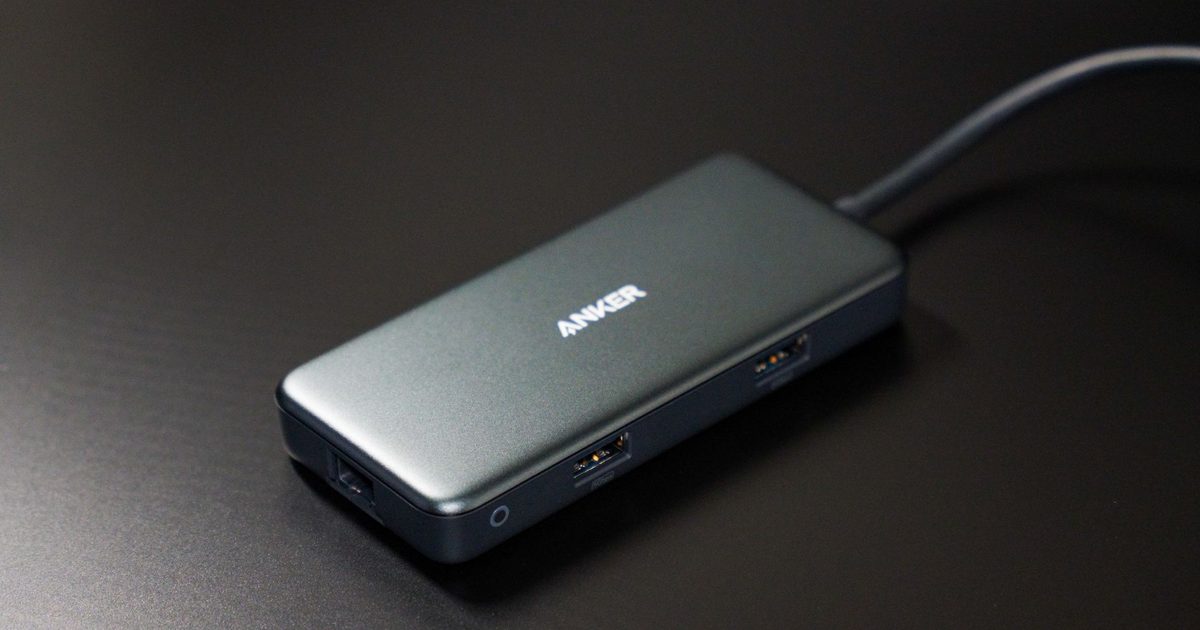
2. Anker USB C Hub (7-in-1) with 4K HDMI and 85W PD - Best Budget
SPP Score: 7.9 / 10 - 7-in-1 connectivity. Our value pick.
Capability 7/10 - Versatility 9/10 - Build 8/10 - Value 8/10
This 7-in-1 Anker is the hub camp's best case: the everyday essentials with none of the bulk. The 4K HDMI output handles a single external monitor cleanly, while the 85W Power Delivery passthrough means your laptop can charge through the same hub as it runs your peripherals. Anker is a familiar name in charging and connectivity, and this layout hits the sweet spot between portability and capability.
Pros
- ✓ 4K HDMI output drives an external monitor at high resolution
- ✓ 85W PD passthrough lets the laptop charge through the hub
- ✓ Compact 7-in-1 design travels well between desks
Cons
- ✗ Fewer ports than a full 10-in-1 docking station
- ✗ Single HDMI limits multi-monitor setups
Who it's for: Hybrid workers and students who want one tidy hub for a monitor and peripherals. Who it's not for: Anyone needing several displays or built-in wired Ethernet.
3. Anker USB C Hub 8-in-1 with Ethernet and 10Gbps - Best Premium
SPP Score: 8.6 / 10 - 8-in-1 connectivity, wired Ethernet, high-speed data. Our pick for maximum capability.
Capability 9/10 - Versatility 9/10 - Build 8/10 - Value 8/10
This 8-in-1 Anker is the halfway house the hub-or-dock debate forgets: wired Ethernet and 10Gbps data, the two things travel hubs usually skip, in a body that still fits a bag. For plenty of people it dissolves the choice entirely.
Pros
- ✓ Built-in Ethernet for a stable wired network connection
- ✓ 10Gbps data ports for fast external SSDs and drives
- ✓ 8-in-1 layout balances capability with a reasonably compact body
Cons
- ✗ Single HDMI output, so it won't run a dual-monitor desk on its own
- ✗ 85W passthrough is Anker's rated ceiling, so the hungriest workstation laptops may still want their own charger
Who it's for: Power users moving large files who also want reliable wired networking. Who it's not for: Light users who only need to add a monitor and a couple of USB ports.
Quick verdict
For most people setting up a proper desk, the UGREEN Revodok Pro 210 USB C Docking Station (10-in-1) is the standout, putting display, data and wired networking behind a single cable. If you want the sensible-value option that still drives a 4K monitor and charges your laptop, the Anker USB C Hub (7-in-1) with 4K HDMI and 85W PD covers the essentials neatly. Faster-data and wired-network users should look at the Anker USB C Hub 8-in-1 with Ethernet and 10Gbps.
How we chose
We focused on the specs that actually matter for this category: the number and type of ports, display output, whether wired Ethernet is included, data transfer speed, Power Delivery passthrough, and how portable the unit is. We weighed UK home and hybrid-working setups, where one tidy cable to the laptop is often the goal, and balanced capability against sensible value. Whichever camp you land in, every pick links straight to the live Amazon UK listing so you can weigh up the current price before you buy.
FAQ
Q: What is the difference between a USB C hub and a docking station? A: A hub is compact and usually adds a handful of ports through one cable, ideal for travel, while a docking station does more, often driving extra displays, wired Ethernet and laptop charging so a single cable runs your whole desk.
Q: Do I need Power Delivery passthrough? A: If your laptop charges over USB C and you only have the one port, PD passthrough is worth it so the hub can charge the laptop while also running your peripherals from the same connection.
Q: Will one of these let me run two external monitors? A: Of these three, only the UGREEN Revodok Pro 210 is built for it, with dual HDMI outputs rated for 4K@60Hz; both Anker hubs carry a single HDMI. Your laptop's USB-C video support has the final say, so check that side too.
Affiliate disclosure: This page contains affiliate links. As an Amazon Associate we earn from qualifying purchases, at no extra cost to you. See our disclosure page for details.